Reclaiming backlinks after a migration: when the link survives but your URL doesn't

Written by Aggée Kimpiab
8+ years of SEO experience. Started out machining steel on the factory floor before moving into SEO. Now works with manufacturers, ecommerce brands, and B2B companies on organic growth. Case studies: Lawton Tubes and a DTC ecommerce brand.
Table of Contents
Most link rot advice covers one failure mode: the link itself disappears from the page that was linking to you. Fair enough, but there’s nothing you can do about that from your own site; you’d need the linking site to notice and care. The failure mode this guide covers is the other one, entirely yours to fix: the link is still there, still live, still passing a visitor or a crawler your way, and it lands on a 404 or a redirect that goes nowhere useful.
Why migrations and redesigns are the main cause #
A URL doesn’t go dead on its own. Something changes it: a category gets restructured, a product is discontinued, the store switches platform, the site moves from HTTP to HTTPS, a trailing slash or query parameter gets added or dropped. Every one of those is a deliberate decision made during a redesign or platform migration, and every one of them can leave an old, backlinked URL stranded if the redirect map doesn’t cover it.
It’s also why this keeps happening even on sites with a careful migration. A redirect map built for the URLs the site itself links to internally can still miss a URL nobody internal links to any more, but that an external site linked to years ago. The backlink is the only thing keeping that old URL relevant, and it’s invisible unless you go looking for it.
A typical, illustrative example: a store moves from /product.php?id=847 style URLs on an older platform to /products/waterproof-hiking-boots/ on Shopify. The migration’s redirect map covers every product that’s still for sale, because that list comes straight out of the new platform’s export. It misses the three-year-old blog post review that links to a product discontinued eighteen months ago. Nobody on the team remembers that review exists, but the redirect map was built from the current catalogue, not from a backlink audit, so a URL with real external authority attached to it falls through the gap entirely.
Step 1: Find which of your URLs have links #
Google Search Console’s Links report is free, already set up for your property, and shows exactly this: which of your pages other sites link to, and how many.
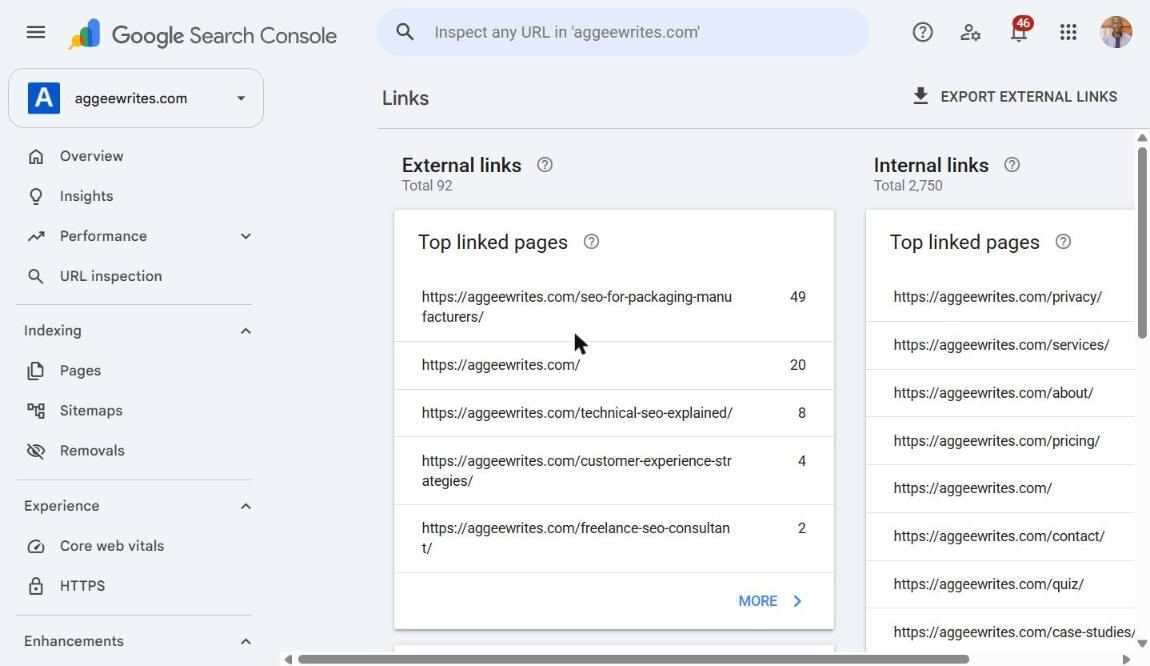
The Links report in Google Search Console lists which of your pages other sites link to. Here, aggeewrites.com has 92 external links, a real capture of this site, not an ecommerce example.
Open Links > External links > Top linked pages, then click More for the full list.
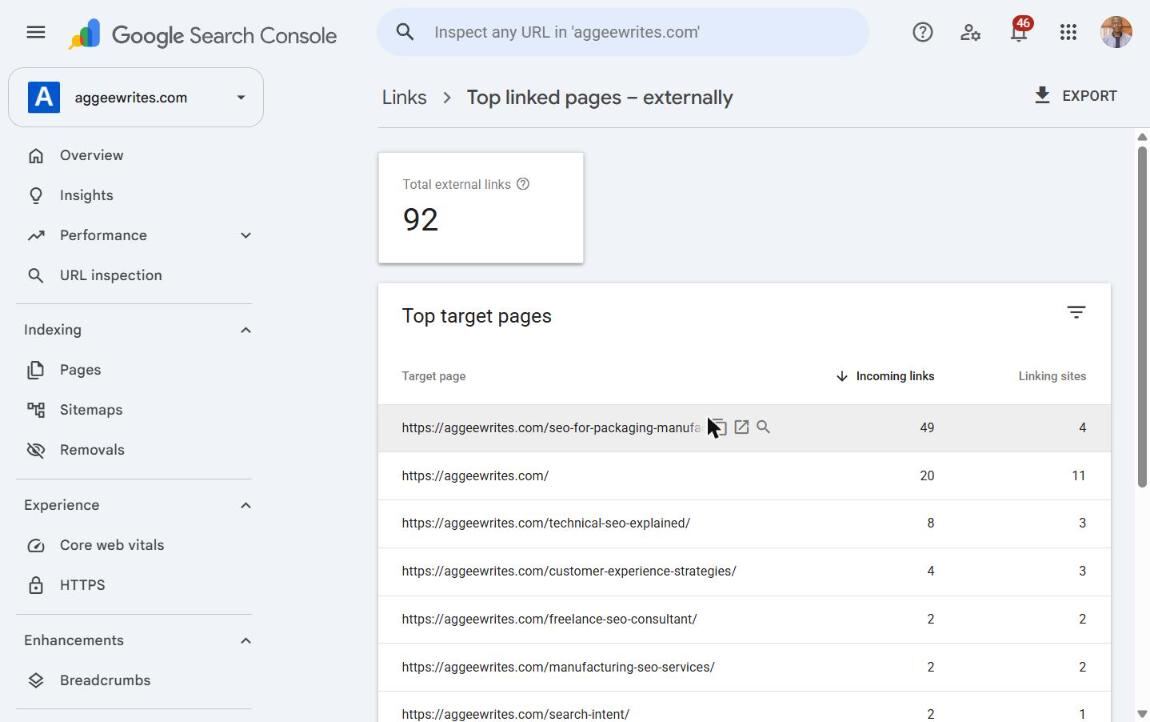
Click "More" under Top linked pages to see every URL with external links, with incoming links and linking sites for each. Here, aggeewrites.com has 12 target pages carrying those 92 links.
Export it if the list is long. Every URL on that list is a page worth checking, regardless of whether it currently ranks for anything, because the backlink has value independent of current rankings.
Step 2: Find which of those now return 404 or redirect badly #
Cross-reference the linked-URL list against Indexing > Pages. The overview chart shows how many known URLs are and aren’t indexed, and why.
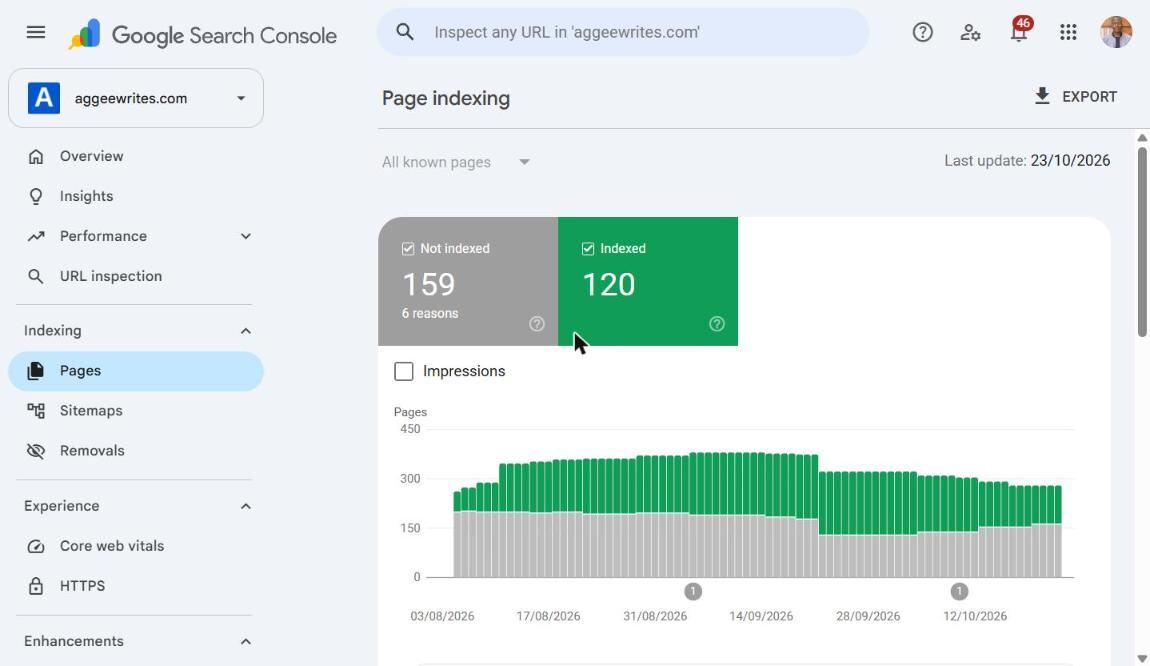
The Page indexing report shows how many known URLs are indexed and why the rest are not. Not indexed doesn't automatically mean broken, most of these 159 are pages that were never meant to rank, so check the reasons below rather than reading this number alone.
The reason that matters most here is Not found (404).
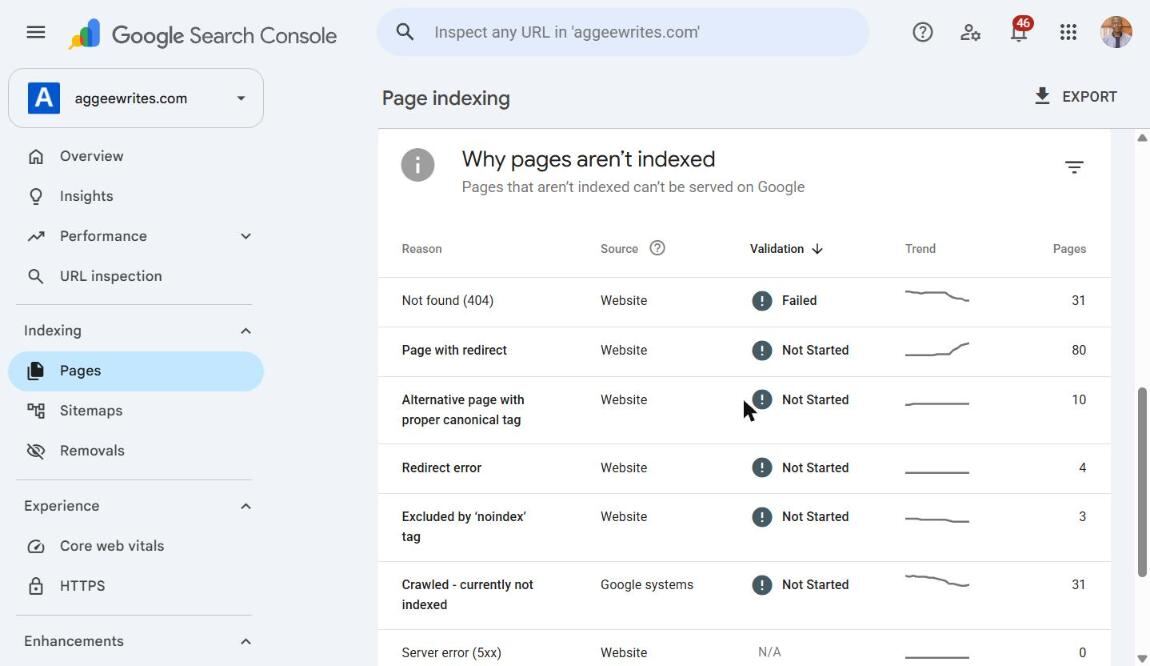
"Not found (404)" lists URLs Google knows about that no longer exist. Cross-check these against your backlinked pages list from Step 1, any overlap is a dead URL that's still earning a link somewhere.
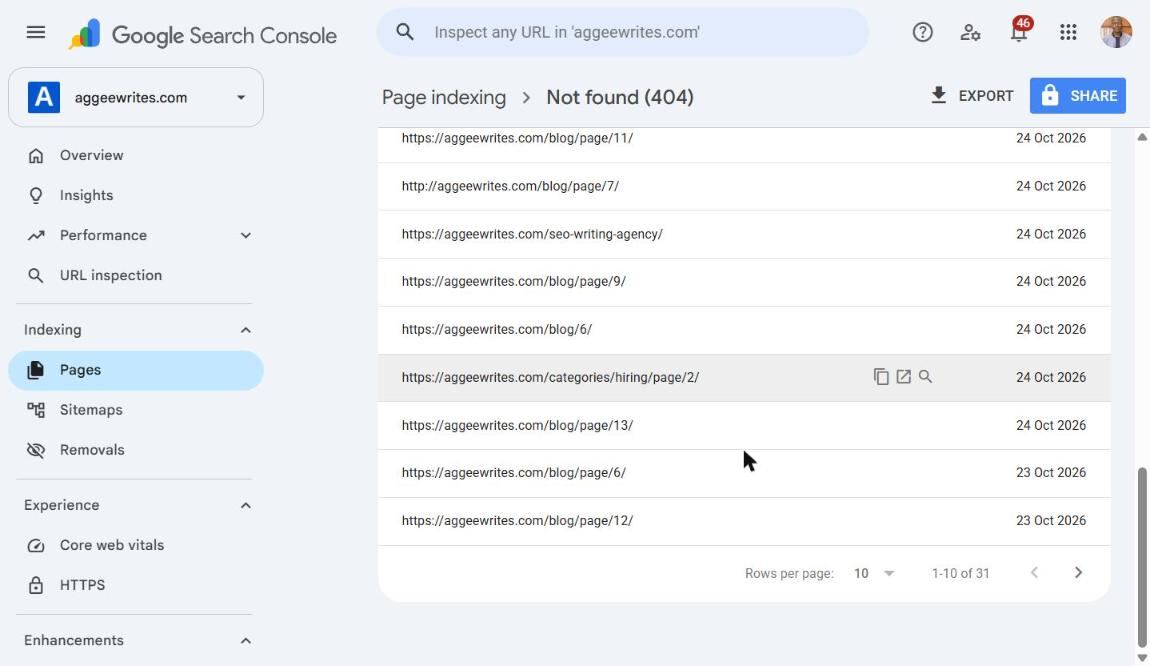
The 404 URL list itself. On this site most of these are blog pagination URLs, which have no external links and need no redirect. That's the actual check: not every 404 matters, only the ones overlapping Step 1's list.
Also check Page with redirect: a URL that redirects isn’t automatically fine.
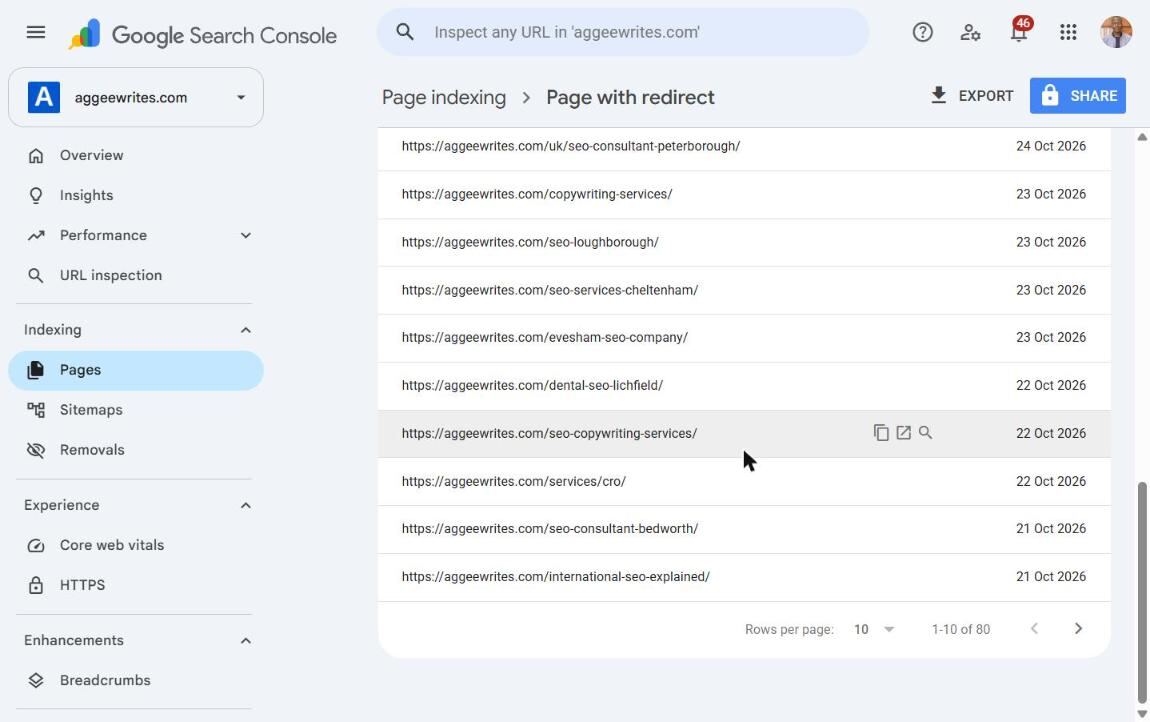
The URL list behind "Page with redirect", 80 affected pages on this site. The list won't tell you where each one lands: open each to check.
Three specific problems hide inside that one report:
- A chain. The old URL redirects to a second URL, which redirects again to a third. Each hop is a small extra delay and a small extra loss of signal, and chains tend to appear after a site’s been through more than one migration without anyone cleaning up the earlier redirects.
- A wrong destination. The redirect fires, returns a 200, but lands somewhere that has nothing to do with what was originally linked, often the homepage, set as a catch-all default rather than decided per URL.
- A loop. Rarer, but it happens: URL A redirects to URL B, which redirects back to A. Both the browser and the crawler give up.
All three still waste the backlink’s value even though the status code looks healthy at a glance.
For any URL you’re not sure what it used to be, the Wayback Machine will show you the old page’s content, which tells you what the closest current equivalent should be.
Step 3: Decide per URL #
Not every dead, backlinked URL gets the same fix. Work through each one against this:
| Situation | Decision | Why |
|---|---|---|
| A genuine equivalent page exists | 301 to it | Closest equivalent keeps the link's context intact |
| No direct equivalent, but the category still exists | 301 to the parent category | Still relevant, never redirect to the homepage as a default |
| The page itself is gone with nothing comparable | Restore it, or let it 410 | A forced redirect with no real match reads as spam to users and search engines alike |
| The redirect exists but loops or chains | Collapse it to one direct 301 | Each extra hop loses some signal and slows the request |
Step 4: Build the redirect map #
Every decision from Step 3 goes into one document, not scattered individual fixes. Use the redirect map template (CSV), one row per URL.

The template filled in with real rows from this site. Pages with no external links get "no action", pages with links get a decision, some marked "to decide" rather than guessed at on the spot.
| old_url | status_now | decision | new_url |
|---|---|---|---|
| /old-category/ | 404 | 301 | /new-category/ |
| /old-product/ | 404 | 410 | – |
Illustrative rows from the template, not a real client's map. Avoid chains (A to B to C), loops, and mass redirects to the homepage as a default.
Step 5: Fix internal links too #
The same dead URLs are often still linked internally: an old blog post, a footer link, a sitemap that was never regenerated. Once a URL has a 301 in place, update the internal links to point straight at the new URL instead of relying on the redirect hop. It’s a small thing, but a site full of internal links to redirected URLs is extra work for every crawl, for no benefit once you already know where the link should go.
Step 6: Ask for a link update only where it’s worth it #
A redirect fixes the destination, but not always the full value. If the linking page is high-authority, or the anchor text and surrounding context describe the old page in a way that no longer matches the new one, a short, polite message asking them to update the URL is worth the effort. Do this for your best handful of links. It doesn’t scale to ninety, and most redirects don’t need it.
Keep the message short and specific, not a template: name the exact page and the exact old link, say what’s changed, and give them the new URL directly rather than asking them to go find it. Something close to: “I noticed [page] links to [old URL], which now redirects. If useful, the current page covering that is [new URL].” No mention of SEO value to them, no pitch, just the practical fact that their existing link points somewhere out of date.
Mistakes that undo the fix #
A few habits quietly waste the work above even after the redirects are technically live:
Redirecting everything to the homepage as a default. It clears the 404 report, but a backlink pointing at a specific product or category, redirected to the homepage, loses almost all of its topical relevance. Google treats a mass homepage redirect as close to a soft 404.
Removing redirects after “enough time has passed.” There’s no expiry date on a backlink. A redirect removed because traffic through it looks low just creates a new dead URL, on a page that was already proven to be linked.
Fixing the redirect but leaving the old URL in the sitemap or internal navigation. It sends mixed signals: a redirect saying “this moved” next to internal links saying “this is still here.”
Treating the audit as a one-off. New backlinks arrive, categories keep getting restructured, products keep getting discontinued. A quarterly repeat of Steps 1 and 2 catches the next batch before it accumulates the way the first one did.
Step 7: Verify and measure #
Test every redirect directly, not just the ones you remember fixing. A quick way: curl -I https://yourdomain.com/old-url/ should show a 301 status line and the correct Location header, not a 200, a 302, or another redirect in the chain. Checking more than a couple of URLs by hand gets old fast, so here’s a small script that runs the same check down a whole list and prints the status and destination for each line.

The script's output before fixing two 404s found earlier in this audit. The matching after shot doesn't exist yet: it'll get added once those two are actually redirected, not mocked up before the fix is real.
In Search Console, use Validate Fix on the Not found (404) report once your fixes are live.
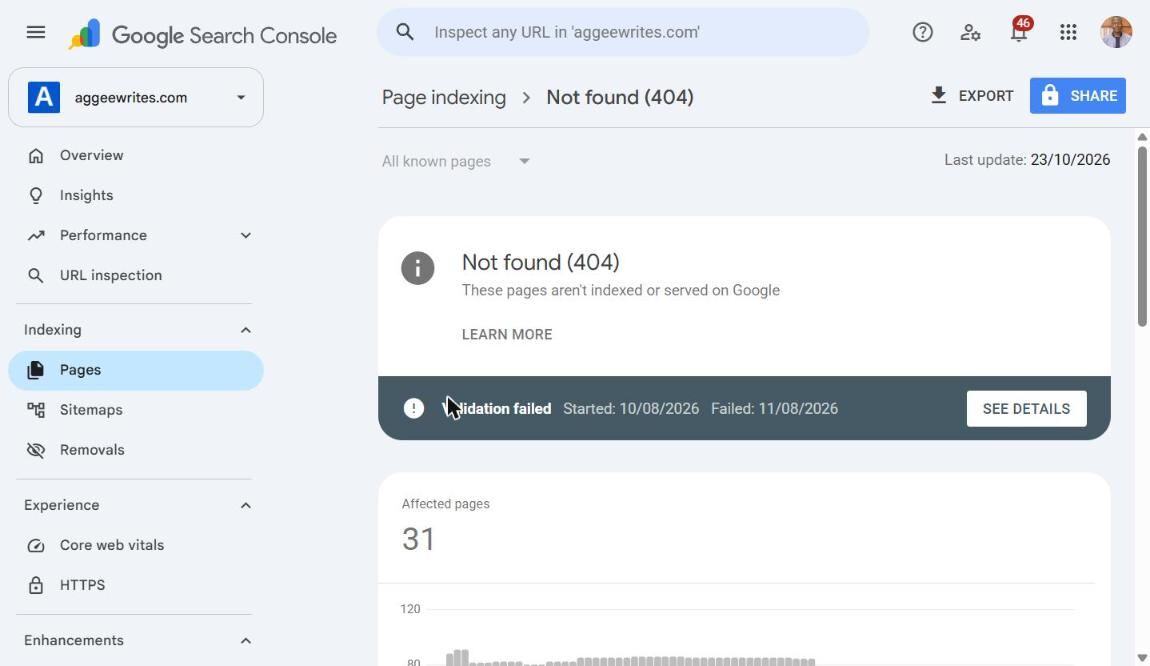
What a failed validation looks like: Google rechecked and the 404s were still there. Not a dead end, just a sign to finish the fixes and validate again.
The Page with redirect report has its own Validate Fix button, separate from the 404 one, for confirming a redirect resolves correctly rather than chaining or landing on the wrong page.
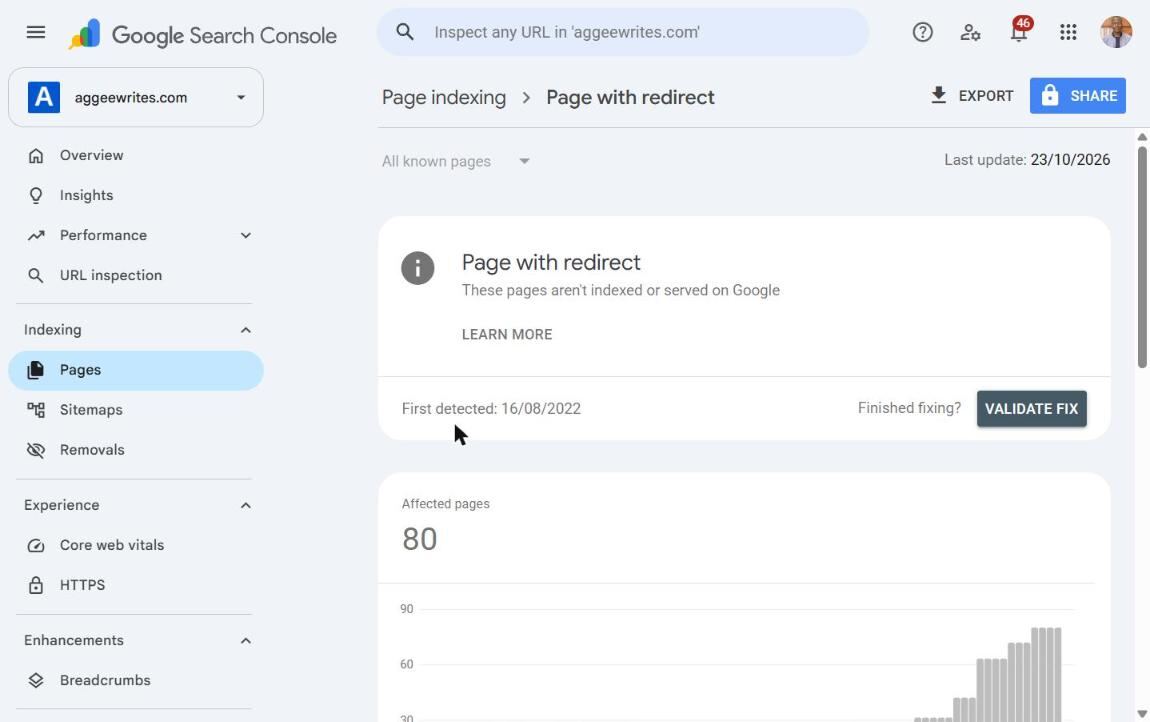
Where that button sits once fixing is actually done. Don't click it early: it starts a real validation run.
Check back in a few weeks either way. The Links report itself is slow to update, so don’t expect the external link count to visibly shift overnight. What you’re watching for is the overlap between your backlinked-pages list and your error reports shrinking over time.
FAQ #
Does a 301 redirect still pass the original link’s value? Yes, a direct 301 to the right page carries the large majority of the original signal. What breaks that is a chain of multiple redirects, a mismatched destination, or using a 302 instead, which search engines treat as temporary and are slower to credit fully.
How long should old redirects stay in place? Indefinitely, if the backlink is still live. Removing a redirect once traffic looks low is one of the more common ways sites quietly lose equity they’d already recovered, since the backlink itself doesn’t expire just because you stopped checking it.
Should a dead URL with no backlinks get a 404 or a 410? Either is fine for most purposes, but a 410 (Gone) is a slightly stronger, faster signal that the page isn’t coming back, which can help Google deprioritise it from crawling sooner than a 404 would.
Is it worth fixing a dead URL with only one or two low-authority backlinks? Usually yes, if it’s already on your list, since it’s typically a one-line addition to a redirect map you’re already building. Where it stops being worth the time is going looking for single-link pages you wouldn’t otherwise have found: effort better spent on pages with several linking domains.
Backlink reclamation is one of the fastest, most measurable wins in any ecommerce SEO audit, because the hard part (earning the link in the first place) is already done. If the audit above turns up more than a handful of results, that’s real, recoverable authority sitting on your own domain, not someone else’s.
Related reading: Ecommerce platform migration SEO · Duplicate content on ecommerce sites · Ecommerce SEO audit checklist · Ecommerce SEO services · Ecommerce SEO consultant